
Online Metronome
Set the tempo, pick a time signature and press Start. Click a beat to accent or silence it; tap the tempo of a song you hear.
Free · runs in your browser · nothing is uploaded
Recent
Your last 10 settings, saved only in this browser. Nothing is uploaded.
This free online metronome runs in your browser: no download, no account. It clicks at any tempo from 20 to 300 beats per minute (BPM), in time signatures from 1/4 to 12/8, and every beat is its own button. Click a beat dot to make it an accent, a normal click or a silent beat, so a 4/4 bar can be “loud, soft, soft, soft” or a drummer’s “click only on 2 and 4”.
Use it for scales, pieces and drum or guitar practice. If you do not know the speed of a song, tap the Tap tempo button in time with it and the BPM follows your taps. Open the page with ?bpm=96 on the end of the address to start at 96 BPM.
How to use the online metronome
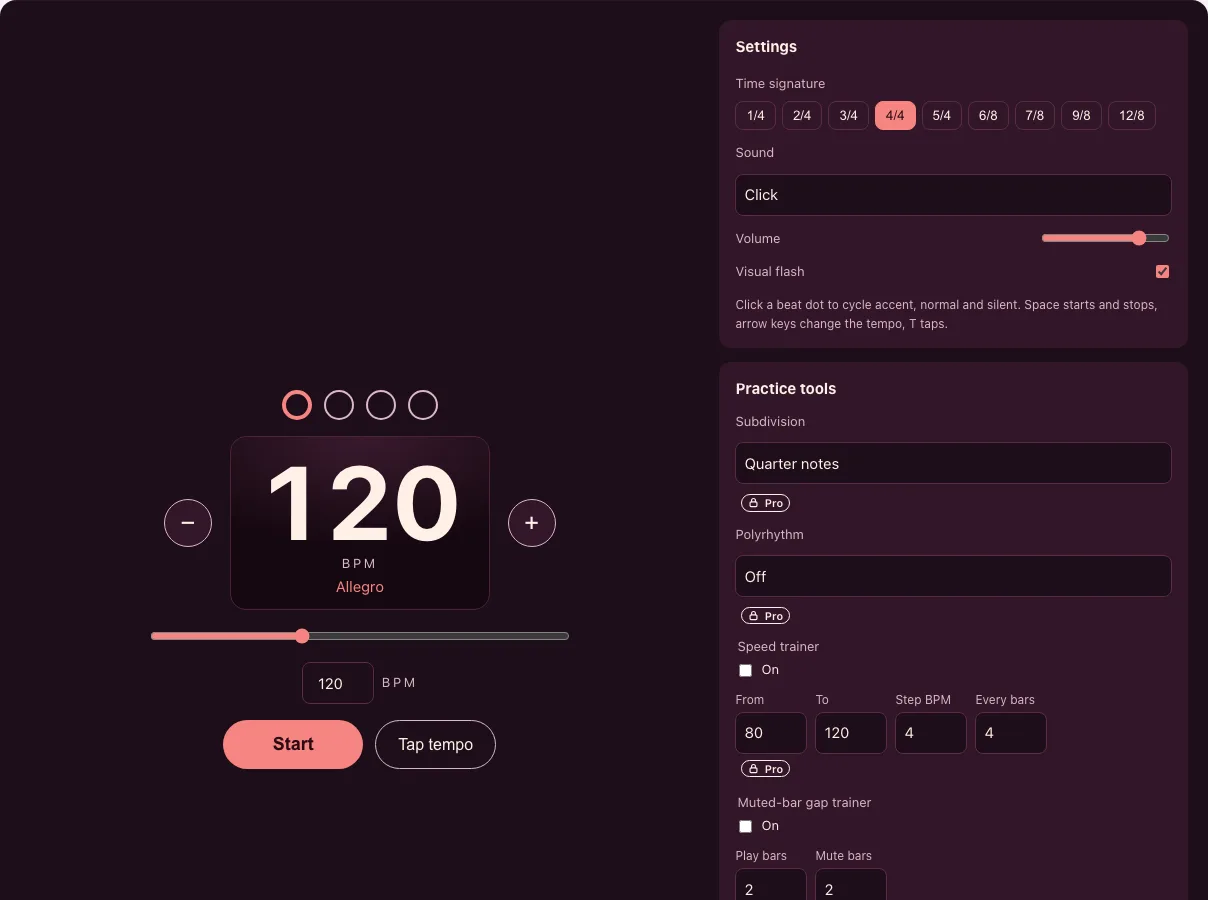
- Set the tempo. Drag the slider, press the − and + buttons (one BPM each), type a number in the BPM box, or use the arrow keys (hold Shift for steps of ten). The Italian tempo word under the number (Andante, Allegro, Presto) updates as you go.
- Choose a time signature. Press one of 1/4, 2/4, 3/4, 4/4, 5/4, 6/8, 7/8, 9/8 or 12/8. The dots above the number show the beats of one bar. In 6/8, 9/8 and 12/8 the metronome counts dotted quarter notes, so 6/8 shows two beats.
- Shape the accents. Click a dot to cycle accent, normal and silent. Beat 1 starts as the accent.
- Pick a sound and press Start. Choose Click, Wood or Beep, set the volume, and tick Visual flash if you want to see the beat as well as hear it. Space starts and stops, and the T key taps.
- Tap a tempo you hear. Tap the button four or five times along with a song; stray or double taps are ignored. For a more careful reading, use the BPM finder, which can also listen through the microphone.
The Practice tools panel shows what Tonelume Pro adds: subdivisions (eighths, triplets, sixteenths), a polyrhythm lane, a speed trainer that raises the tempo bar by bar, a muted-bar gap trainer, a practice timer and setlists with a tempo per song. Pressing one of these controls without Pro opens a short sheet that says what it does and how to get Pro; everything above stays free.
What is a metronome and what does BPM mean?
A metronome is a device that gives a steady beat so you can practise at an even speed. BPM means beats per minute: at 60 BPM there is one click every second, at 120 BPM two clicks every second. The higher the number, the faster the music. A traditional wind-up pyramid metronome is marked from about 40 to 208 BPM; this one goes from 20 to 300.
BPM and click spacing
The gap between two clicks is 60,000 divided by the BPM, in milliseconds. These are the tempos people look for most:
| BPM | Gap between clicks | Tempo word |
|---|---|---|
| 40 | 1500 ms | Largo |
| 60 | 1000 ms | Larghetto |
| 80 | 750 ms | Andante |
| 100 | 600 ms | Andante |
| 120 | 500 ms | Allegro |
| 140 | 428.6 ms | Allegro |
| 160 | 375 ms | Vivace |
| 180 | 333.3 ms | Presto |
| 200 | 300 ms | Prestissimo |
Tempo words overlap between sources; the words here follow the ranges used by the Tonelume tempo table: Largo from 40, Larghetto from 60, Adagio from 66, Andante from 76, Moderato from 108, Allegro from 120, Vivace from 156, Presto from 168, Prestissimo from 200.
How do I count 6/8, 3/4 and 4/4?
In 4/4 there are four beats in a bar, counted 1-2-3-4, and the first is usually the accent. In 3/4 there are three (a waltz: ONE-two-three). In 6/8 there are six eighth notes grouped as two dotted-quarter beats, counted ONE-and-a TWO-and-a. This metronome clicks the two main beats of a 6/8 bar at the BPM you set; the BPM is the speed of the dotted quarter, so 6/8 at 60 BPM means 60 dotted quarters per minute. For 5/4 and 7/8 click the dots to place the accents where your piece puts them, for example 3+2 or 2+2+3.
How steady is the click?
A browser metronome is only useful if the clicks land on time. Tonelume schedules each click on the audio clock a fraction of a second ahead instead of firing it from a timer, which is how the page keeps its time while the rest of the page is busy. We measured it in headless Chromium, recording the rendered audio of 64 sixteenth notes at 120 BPM per run:
| Condition | Clicks missed | Worst deviation from the grid |
|---|---|---|
| Idle page | 0 of 64 | 0 ms |
| Page blocked for 80 ms every 300 ms | 0 of 64 | 0 ms |
| Page blocked for 250 ms every 300 ms | 20 to 21 of 64 | not applicable |
A block longer than the look-ahead (about 0.12 s) can still drop clicks, so keep other heavy tabs closed while you practise. The timing test is part of our build and the numbers are kept with the code.
Frequently asked questions
What is the best BPM for practice?
Start at a speed where you can play the passage cleanly, usually 60 to 80 BPM for new material. When it sounds even, raise the tempo by 4 to 5 BPM. Practising slowly and building up is faster in the end than playing fast with mistakes.
What does 120 BPM sound like?
120 BPM is two beats per second, a click every 500 ms. It is a typical walking pace and a common tempo for pop and dance music, and the lower edge of Allegro.
How do I use a metronome for 6/8?
Press 6/8. The metronome counts two beats per bar, each a dotted quarter note made of three eighths. Set the BPM to the speed of that dotted quarter. For a slow 6/8 ballad try 40 to 60 BPM.
Can I make beat 1 louder or silence a beat?
Yes. Click any dot above the BPM number: it goes from accent to normal to silent and back. You can change accents while the metronome is running.
How do I find the tempo of a song?
Press Tap tempo along with the music, four or five taps are enough. For a recording that is playing near your device, the BPM finder can listen through the microphone and show the tempo live.
Why can’t I hear the click?
Browsers start audio only after you press something on the page, so press Start yourself. Then check the device volume and the silent switch on a phone. If the Visual flash box is ticked you will see the beat even without sound.
Is the metronome free, and does it work offline on a phone?
The metronome is free and needs no account. It runs entirely in the browser on phones, tablets and computers; the last tempo is remembered on your device only. Pro adds practice tools on top, from $7.99 a month.
Related tools
- BPM finder: use this to find the tempo of a song by tapping or by listening through the microphone.
- Guitar tuner: tune each string with a live needle before you set the click.
- Online tuner: a chromatic tuner for any instrument, with cents and A4 calibration.
- Practice planner: log how long you practised and see your week.
- Tonelume home: all Tonelume tools in one place.
- About Tonelume: who runs the site and how the tools are built.
- Credits and licences: the open-source libraries used in the tools.
- Privacy policy: what the site stores on your device and what it never sends.